
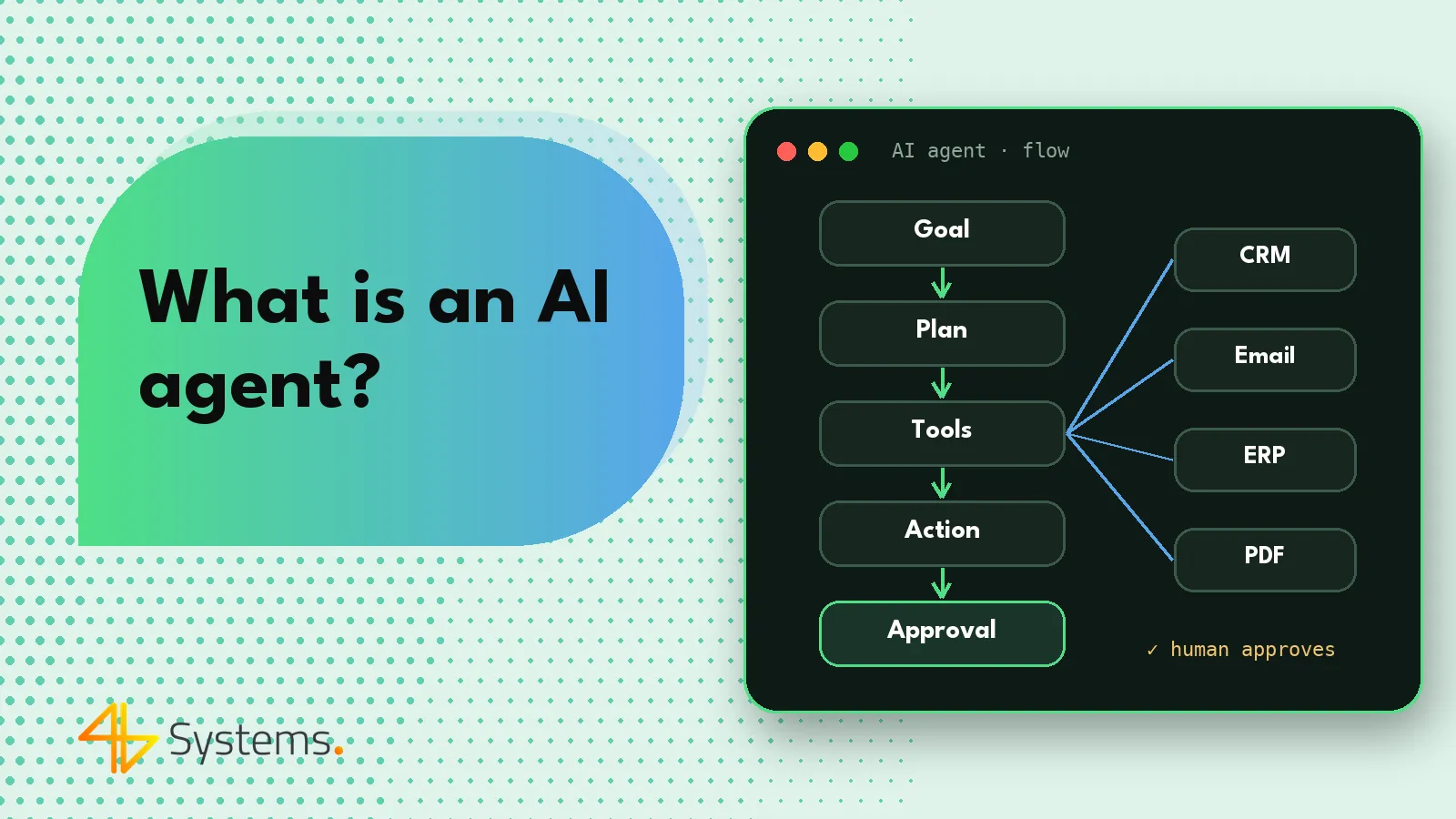
An AI agent is a program based on a large language model that receives a goal, plans the next steps on its own and carries them out using tools – for example, it looks up a customer in the CRM, reads an email thread, prepares an offer, creates a task in the calendar or updates the status of a case. Unlike a chatbot, an agent doesn't stop at a text reply, and unlike classic automation, it doesn't need a rigid script for every possible situation. A well-designed AI agent operates within set boundaries: it has only the permissions it needs, logs every action and passes more significant decisions to a human for approval.
In this article we explain what an AI agent is in business practice, what elements it consists of, what its action loop looks like and when it really has an advantage over simpler solutions. If you're looking for specific scenarios for your company, also take a look at our overview of AI agent examples across different departments.
What is an AI agent – in simple terms
The simplest comparison is a new, very fast coworker who has been given access to a few systems and a job description. You don't tell them which buttons to click – you tell them what needs to be achieved: "prepare a reply to the request for quotation and complete the customer's details in the CRM". The agent works out for itself that it first needs to read the email, then check whether the customer already exists in the database, then select products from the price list, prepare a draft offer and pass it to the salesperson for approval.
Under the hood there is a language model, such as Claude, GPT or Gemini, or an open-source model running on the company's server. The model on its own can "only" generate text. It becomes an agent only when it is given three things: a goal, tools to act in the outside world, and a loop in which it can observe the results of its actions and decide on the next step.
The question "what are AI agents?" comes up in many companies today, because the term is often overused. Not every product labeled "AI agent" is an agent in the strict sense. If a solution always performs the same sequence of steps and the model only generates content in one of them, it is really AI-assisted automation. That can be very valuable too – but it's worth knowing what you're buying.
How an AI agent works – six key elements
1. Goal and instructions
The agent starts with a defined task and the rules for carrying it out. The instructions (the so-called system prompt) describe the agent's role, tone of communication, limits of action and the situations in which it should stop and ask a human. The more precisely the goal and the "task done" criteria are described, the more predictably the agent behaves.
2. Planning
The model breaks the goal down into smaller steps. Sometimes it does this explicitly – it creates a task list and then ticks items off – and sometimes it plans step by step, reacting to what it sees. In business processes we often combine both approaches: the overall flow is fixed (e.g. "verification first, then the reply"), and the agent decides on the details at each stage.
3. Tools
These are the agent's hands. A tool can be a knowledge base search, reading from and writing to the CRM, sending an email, checking free slots in a calendar, fetching an invoice from the accounting system or calling any API. Each tool has a description from which the model learns what it is for and what parameters it accepts. Tools are increasingly made available to agents through the open MCP (Model Context Protocol) standard, which makes it easier to connect further systems without writing everything from scratch.
4. Memory
The agent has to remember what it has already done in the current task (short-term memory, i.e. the conversation context and tool results), and often also know more about the company and its customers (long-term memory). The latter is usually implemented through a knowledge base with semantic search, notes saved by the agent or simply by reading the history from the CRM. It is important for memory to be controlled – you know what the agent remembers, for how long and who has access to it.
5. The action loop
The heart of an agent is the loop: think – act – check the result – decide what's next. The model chooses a tool, the system executes it, the result goes back to the model, and the model assesses whether the goal is closer. The loop continues until the task is completed, the agent hits a situation that requires a human, or it exceeds the set limit of steps or costs.
6. Human oversight
In business applications this is a mandatory element, not an add-on. The agent can prepare and check things on its own, but sending an offer, changing contract terms or making a transfer should require approval. Oversight also includes access to logs, the ability to stop the agent and a clear escalation path. This approach is in line with the spirit of the EU AI Act, which strongly emphasizes human oversight of AI systems.
The AI agent loop – an example with a request for quotation
Let's see how this could work at a trading company that receives inquiries through a form and by email:
- Trigger – an email asking about products arrives in the sales inbox.
- Understanding – the agent reads the message, recognizes that it is a request for quotation and extracts the key details: company, contact person, products, quantities, deadline.
- Verification – it checks in the CRM whether the customer exists; if so, it retrieves the order history and the assigned account manager.
- Data completion – it creates or updates the customer record and the sales opportunity.
- Preparation – it selects items from the price list and prepares a draft offer and an email reply.
- Check – it verifies that all required fields are filled in and that the discount is within the permitted range.
- Approval – it passes the draft to the account manager with a short summary; the salesperson approves, edits or rejects it.
- Closing – after approval, it sends the offer, sets a follow-up reminder and records all actions in the log.
Note that the agent didn't need a programmed path for every variant of the email. If the inquiry is unclear, it can add clarifying questions to the draft. If the customer has overdue payments, it can flag this to the salesperson. This flexibility is what sets an agent apart from classic automation.
AI agent vs. chatbot vs. regular automation – comparison table
The three concepts most often confused are the chatbot, business process automation and the AI agent. Each has its place – the table below shows the most important differences.
| Feature | AI chatbot | Automation (e.g. rules, workflows) | AI agent |
|---|---|---|---|
| Main task | Conversation and answering questions | Executing a predefined sequence of steps | Achieving a goal, including through steps not explicitly planned |
| Who decides on the next step | The user asks the next question | The workflow designer ("if – then" rules) | The model, within the limits set by instructions and permissions |
| Actions in systems | Usually none or very limited | Yes, but only the programmed ones | Yes, through a set of tools chosen to fit the situation |
| Handling unusual cases | Answers, but doesn't resolve the case | Poor – an unforeseen case ends in an error | Good – can gather more information or escalate |
| Predictability | Medium | Very high | Medium – requires limits, testing and oversight |
| Cost per run | Low | Very low | Higher – many model calls in a loop |
| Typical use | FAQ, first line of contact on the website | Repetitive, stable processes with data in a fixed format | Processes with unstructured data and many variants |
In practice, these solutions are combined. An AI chatbot on a website can be the "face" of an agent that books meetings and creates tickets in the background. Conversely, an automation platform such as n8n can run an agent only in the one process step that requires understanding content, and handle the rest in the traditional, low-cost way.
When an AI agent makes sense and when a simpler solution is enough
An AI agent is not the answer to every problem. It is worth considering when a process meets several conditions at once:
- the input data is unstructured – emails, documents, notes, conversations, scans, not just form fields;
- there are many variants and they cannot reasonably be described with rules;
- the process requires reaching into several systems – CRM, email, ERP, calendar, knowledge base;
- a mistake is reversible or a human can approve before it takes effect;
- the volume is large enough for the time saved by the team to matter.
On the other hand, an agent is usually not a good choice when the process is fully repetitive and data arrives in a fixed format (automation is enough), when every decision has serious legal or financial consequences and no checks can be introduced, or when the volume is so small that the implementation won't pay for itself. Another common mistake is trying to build an "agent for everything". An agent specialized in one process, with a narrow set of tools, delivers much better results.
Types of AI agents found in companies
An assistant working with a human
The agent acts at an employee's request: it prepares a customer summary before a meeting, drafts a reply, finds a document. The human assesses the result straight away. This is the safest starting point and a good way for the team to get used to the technology.
A process agent running in the background
It starts on its own – when an email arrives, when a status changes in the CRM, at a set time. It does the preparatory work and leaves only what requires it for approval. This is the type of agent that saves the most time in back office, sales and customer service.
Multi-agent systems
Several specialized agents work together: one classifies tickets, a second looks for a solution in the knowledge base, a third prepares the reply, and a "coordinator" oversees the whole. Such architectures make sense for complex processes, but they increase costs and make testing harder – it's not worth starting with them.
Coding agents
A separate category is agents that work with code, reading the repository, making changes and running tests. An example is Claude Code. In a software house it is a developer's working tool rather than an agent handling the client's business processes, but the principle is the same: goal, tools, loop and oversight.
AI agent risks and how to mitigate them
Since an agent can act in systems, its mistakes have bigger consequences than a chatbot's. That is why we apply a few principles in design that are worth knowing as a client too:
- Least privilege – the agent has access only to the data and operations it needs. If it is supposed to read invoices, it shouldn't be able to delete them.
- Approval of key actions – sending to customers, financial changes, deleting data or decisions about people go through a human.
- Logs of every action – you know what the agent did, when, on what basis and with what result. This is the foundation for audits and for improving the instructions.
- Limits – a maximum number of steps per task, daily and monthly cost limits, limits on the number of messages sent.
- Protection against prompt injection – external content (emails, web pages, documents) may contain hidden commands. The agent must treat it as data, not instructions, and critical actions cannot depend solely on its judgment.
- Personal data and GDPR – you need to establish where the data is processed, on what terms the model provider operates and whether it would be better to use a model running on the company's own server.
- Testing on real cases – before launch, the agent goes through a set of historical cases, and its results are compared with what an employee would have done.
These principles are not an obstacle to achieving benefits – on the contrary, they are what allow the agent to be given real work and the team to trust it.
How to get started with an AI agent in your company
The most sensible path is a short process audit, choosing one process with high volume and reversible consequences, and then a pilot with clear success metrics: handling time, the share of cases completed without corrections, the number of escalations, cost per case. Only once the pilot works does it make sense to expand the scope. You'll find a detailed plan in our article on AI implementation in business, step by step.
When choosing the technology, remember that the model is only one of the elements. The quality of an agent depends largely on well-described tools, access to up-to-date data, well-thought-out approval points and monitoring. The 4B Systems team designs AI agents for business in exactly this way – with integrations with CRM, email, ERP and calendars, and with a choice of model matched to the data and budget, including open-source models running on the client's infrastructure.
Want to check whether an AI agent makes sense in your process? Start with a short audit – we'll identify a process where an agent can take work off your team, define the human approval points and propose a pilot. See how AI agent implementation at 4B Systems works, or get in touch via our contact form.
Frequently asked questions
What is an AI agent in one sentence?
An AI agent is a system based on a language model that receives a goal, plans the steps itself and carries them out using tools, for example in a CRM, email or calendar. It works in a loop: it takes an action, checks the result and decides on the next step.
How is an AI agent different from a chatbot?
A chatbot holds a conversation and answers questions, but it usually doesn't take actions in company systems. An AI agent can look up data, update a record or prepare a document on its own, and conversation is just one of the tools available to it.
Will an AI agent replace business process automation?
No – it rather complements it. Repetitive steps with data in a fixed format are handled better and more cheaply by classic automation, while an agent is worth using where you need to understand content, handle many variants or make a decision based on context.
Can an AI agent work without human supervision?
Technically yes, but in a business setting it is not recommended for actions with significant consequences. Good practice is for the agent to work independently on preparation and verification, while a human approves sending things to customers, financial changes and decisions about people.
Which AI models are used to build agents?
Most often commercial models such as Claude, GPT or Gemini, available via an API. When data cannot leave the company, you can use an open-source model running on your own server, although this usually requires more work on tuning and testing.
Where should you start when implementing an AI agent?
With a process audit and the choice of one high-volume process in which mistakes are reversible. Next, run a pilot with clearly defined success metrics, and only after evaluating it expand the agent's scope.